This electric bicycle brand operates through a US dealer network with payment terms, credit limits and rebates. Beyond recording orders, the business needs to understand each dealer’s available credit, order-related utilization, rebate accruals, offsets and remaining balances.
Product and order displays alone do not cover these tasks. The client needed to connect a protected dealer portal with credit rules and account information. Administrators need to review company-level limits, rebates, transactions and receivables for routine reconciliation.
We defined credit, rebate and receivables rules, developed the dealer credit app, and integrated the authenticated portal with order flows. Delivery also includes a rebate dashboard and reporting entry points, bringing transactions, account records and management views together.
The challenges
Orders affect available credit
Orders placed on payment terms need to update credit utilization and available limits.
Rebates and receivables need reconciliation
Administrators need to trace rebates, receivables and settlement information to orders and transactions.
Role-specific access
Dealers access a protected portal, while brand administrators need a consolidated view of companies and credit.
02Our scope of work
Credit and rebate rules
Define the relationships between dealer companies, orders, credit limits, rebates and receivables. Confirm utilization and rebate calculations and establish the modules and verification scenarios required by dealers and internal administrators.
DeliverableCredit rules and module scope
Credit app development
Develop the custom application connecting order activity, credit utilization, rebate entries and related transactions. Associate rule processing with account changes so administrators can review credit activity by company and order.
DeliverableCredit and rebate functionality
Dealer portal and order integration
Configure the authenticated dealer portal and connect it with the order journey. Check that order activity corresponds with credit-system processing and the records shown to administrators.
DeliverableProtected portal and transaction journey
Financial dashboard and reports
Develop a rebate dashboard for accruals, offsets and balances, with records organized by company. Provide credit, rebate and receivables reporting and complete rule validation, system testing and launch acceptance.
DeliverableFinancial views, reports and acceptance
03Pages, features and journeys
Feature demonstration · Test data
01
Review dealer companies and credit information centrally
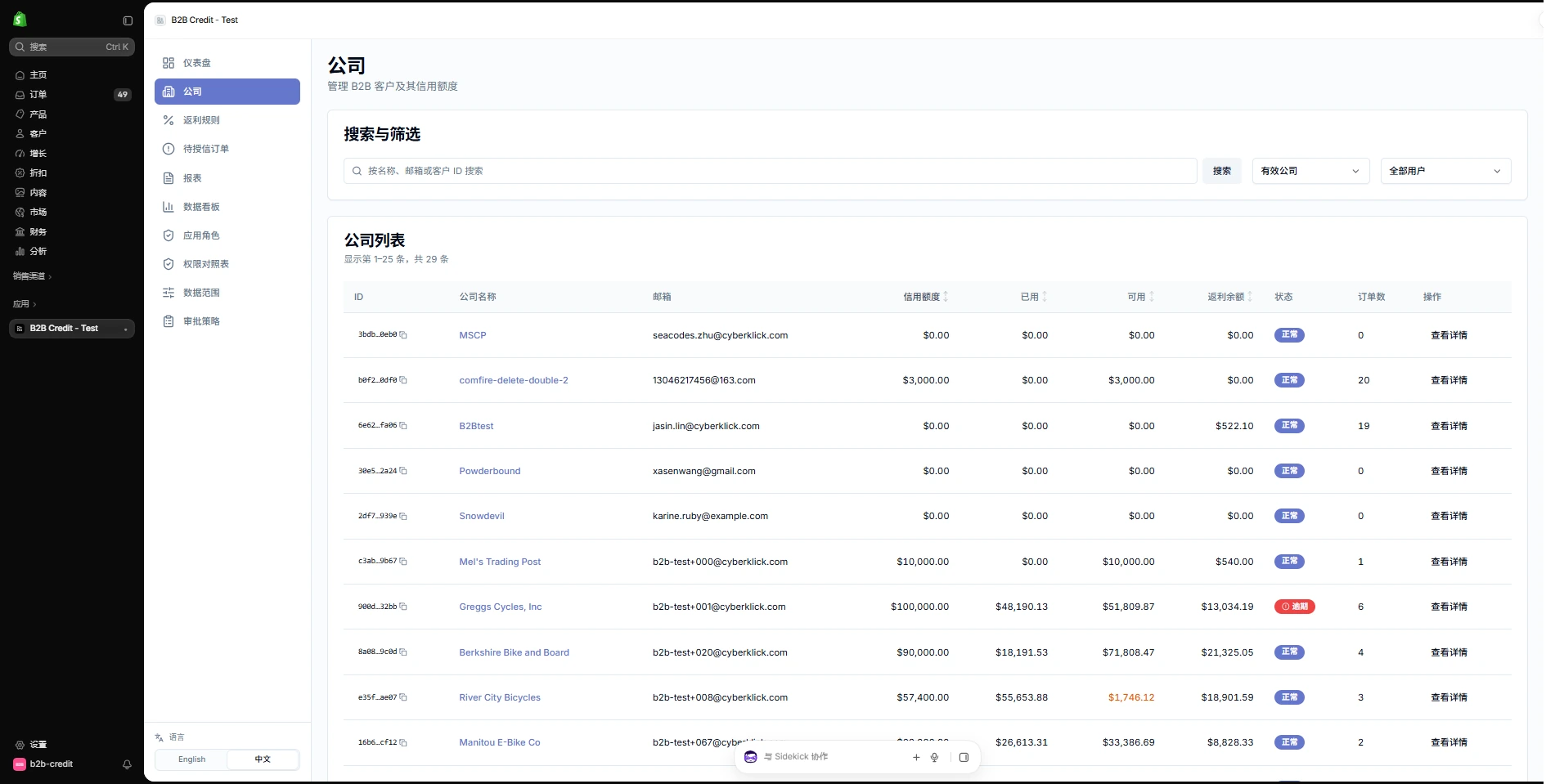
The management interface organizes dealer information around company records, with navigation into the relevant credit modules. Administrators can review account and business information from a shared entry point and use order and transaction records for follow-up checks.
Bring company information and credit modules together.
Connect orders with credit, rebate and receivables records.
Feature demonstration · Test data
02
Connect rebate summaries with company records
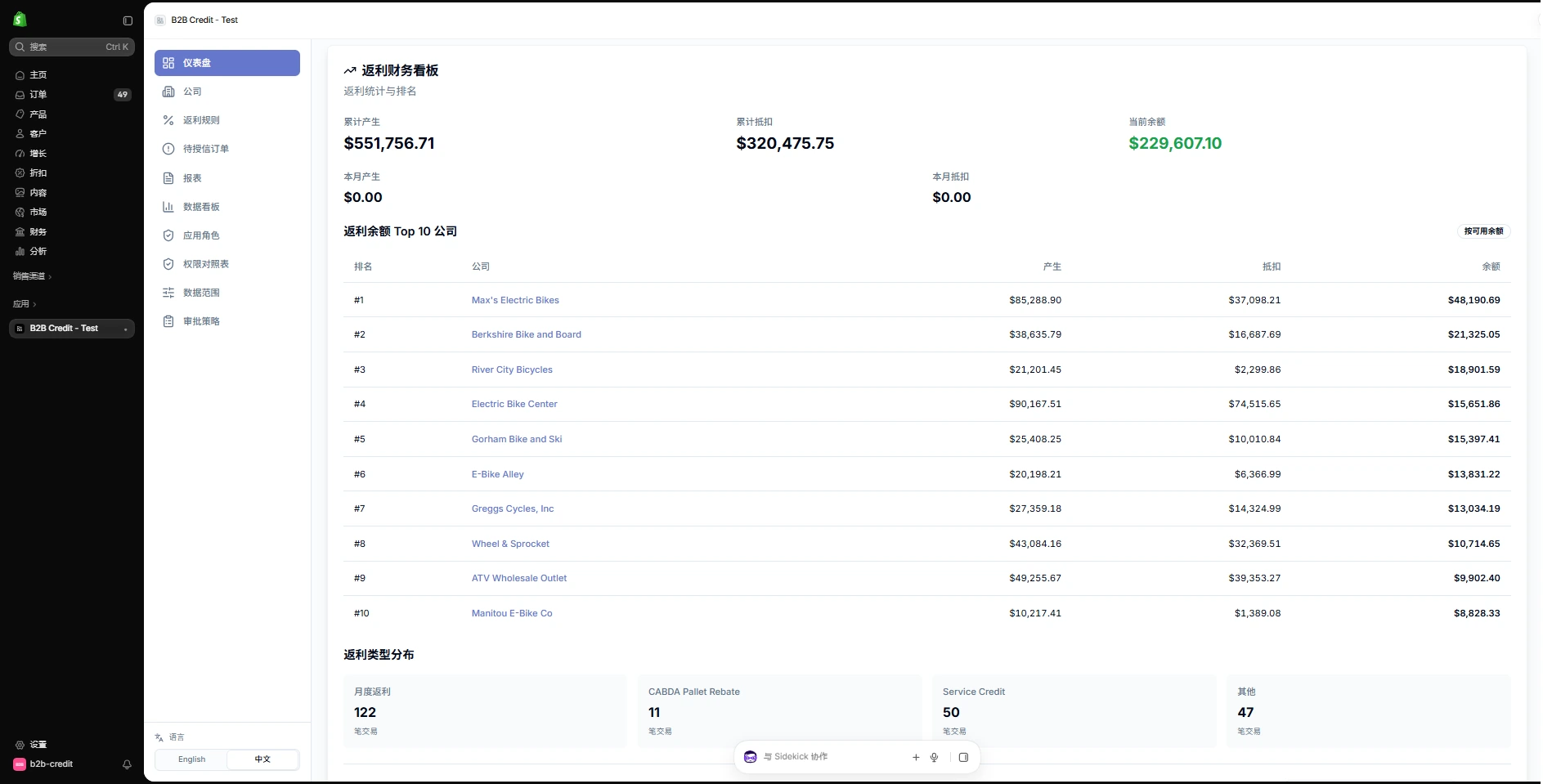
The financial dashboard brings rebate accruals, offsets and balances into one view, followed by company-level records and rebate types. Administrators can move from the summary to company-level reconciliation.
Accruals, offsets and balances appear together.
Company records and rebate types add detail to the summary.
Feature demonstration · Test data
03
Organize credit, rebates and receivables as reports
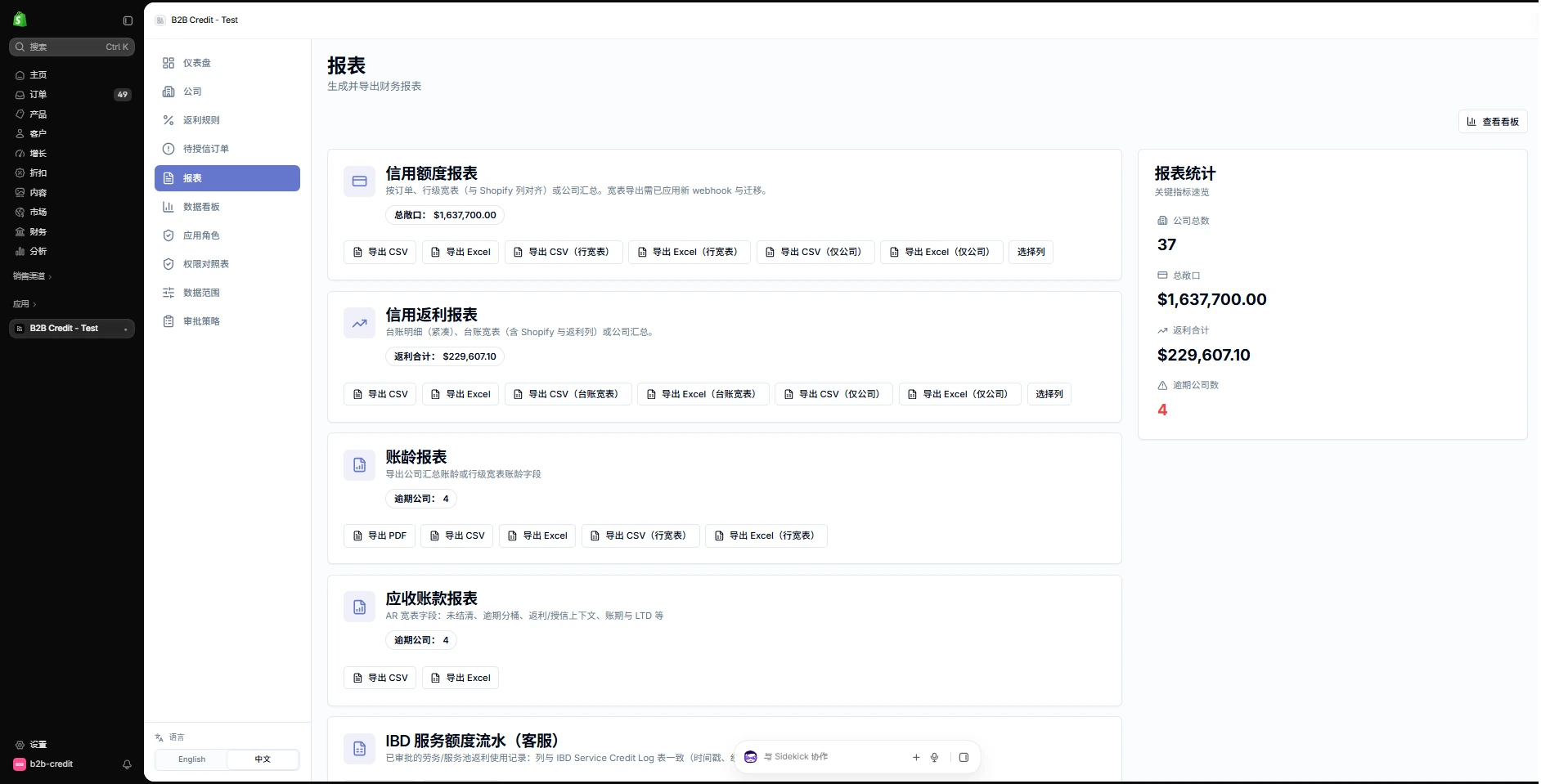
The reporting page separates credit limits, rebates, aging and receivables, with the relevant export controls. Administrators can choose the report that matches the reconciliation task.
Separate reports address distinct business needs.
Exports support follow-up reconciliation outside the app.
Feature demonstration · Test data
04
Review credit and rebates at company level
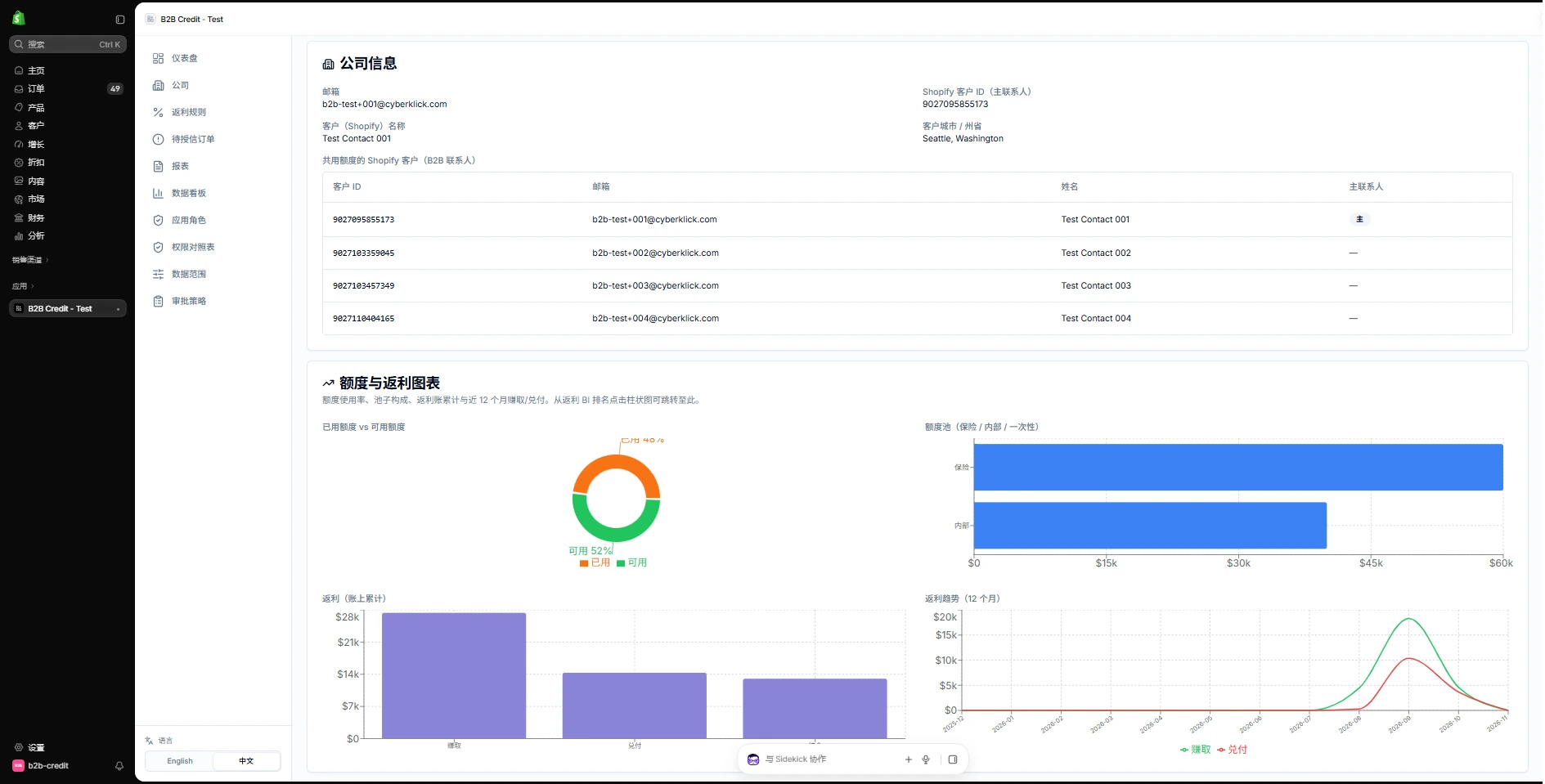
The company detail page combines account information, associated contacts and credit and rebate charts. Administrators can open a company from the list to review its account context and related trends.
Company details and associated accounts appear together.
Credit, rebate and trend charts support account review.
WORKFLOW ILLUSTRATION
Business conditions
Credit and rebate rules
Establish company limits and agreed calculation conditions
Transaction handling
Orders and utilization
Connect order records, credit utilization and rebate entries
Operational review
Settlement and receivables
Review available credit, transactions and receivable status by company
Workflow illustration · Connecting credit, transactions and settlement
05
Connect credit, orders and receivables
The credit system connects dealer credit limits, order-related utilization, rebate entries and transaction records. The admin view organizes information by company; the workflow below explains how these functions relate to dealer operations and internal settlement.
Connecting a dealer order to credit records
Follow the journey from dealer sign-in and ordering through to credit records and administrative review.
Sign in to the portal
The dealer signs in to a protected portal using the relevant business account.
Place an order
Order activity enters the agreed credit-processing workflow.
Record account changes
Record credit utilization, rebates and related transactions under the agreed rules.
Review in the admin interface
Check the account and receivables in the administration view.
04Technical approach and workflows
Key decisions
Link orders to credit changes
Maintain corresponding records for order activity, credit utilization and rebate postings.
Consolidated administration
Keep credit limits, transactions and receivables together for routine reconciliation.
Functional layers and information flow
The credit system organizes limits, rebates and transactions around dealer companies and orders. The portal provides authenticated access, the app handles rules, and dashboards and reports support routine reconciliation.
Portal and company accounts
Dealers access the protected portal, while administrators organize the relevant accounts and transactions by company.
Orders, credit and rebates
Order activity connects credit utilization, rebate entries and transactions, recording changes under the agreed business rules.
Dashboards, receivables and reporting
Financial views summarize rebate accruals, offsets and balances. Credit, rebate and receivables reports provide review and export entry points.
01
Dealers and orders
Conduct business through the protected portal
02
Credit and rebate processing
Record utilization and related transactions
03
Financial reconciliation
Review company dashboards, receivables and reports
A simplified workflow diagram showing responsibilities and information flow.
05Delivery and validation
Business rules and roles
Define the relationships and calculation rules across the dealer portal, credit, rebates and receivables.
Stage deliverableBusiness rules and module scope
Credit app and portal development
Implement credit processing, transaction records and the authenticated portal, connecting companies with orders.
Stage deliverableCredit system and business entry points
Dashboard and reporting integration
Verify rebate accruals, offsets and balances against company information, receivables and reporting.
Stage deliverableManagement views and reports
Rule validation and launch
Test credit, rebates, orders and management interactions under the agreed scenarios before acceptance.
Stage deliverableTested system release
Validation checklist
Identity and access
Check authenticated dealer access and the relevant order journey.
Orders and credit
Verify processing, credit utilization and related transactions.
Rebates and balances
Check accruals, offsets and balance records.
Financial administration
Review company views, receivables dashboards and report exports.
06Deliverables and project value
Transactions connected with credit processing
Limits, utilization, rebate entries and related records extend order management into company account changes.
Company and financial information together
Company records, rebate dashboards and receivables views provide connected entry points for routine administration.
Reports support reconciliation
Credit, rebate and receivables records can be reviewed and exported through the available reporting functions.