MigrationPerformance optimizationCustom development
Technical implementation
Shopify migration & page customization
Shopify · Project preview
Brand homepage · Client details anonymized
01Background and requirements
This smart audio brand sells AI recording devices globally. Its website supports hardware research and purchasing, subscriptions and related services. Home, collection and product pages are key entry points, with substantial images and video that need to be considered alongside loading behavior.
The wider engagement covered regional website migration and reconstruction, including products, collections, content, articles and legacy URL mapping. It also included subscription pricing, device comparisons, an ROI calculator and channel inquiry forms, connecting different purchasing and research journeys.
Performance work addressed home, collection and product pages separately. Their images, videos and scripts differ, requiring page-level diagnostics before loading changes are selected. A single homepage score cannot describe the whole storefront.
We defined separate implementation and validation scopes for migration, custom features and loading improvements. Resource changes were followed by functional regression checks and desktop and mobile retests. Test records describe the relevant page versions, while purchasing, comparison, subscription and inquiry journeys are checked independently.
The challenges
More than a product migration
The scope extends beyond products to content pages, articles, subscription plans, device comparisons and regional browsing paths.
Preserving functionality while improving speed
The migration requires rebuilding interactive pages while optimizing how images, video and third-party scripts load.
Complete search and tracking coverage
Legacy URLs, new pages, language relationships and key conversion events all needed to be included in launch checks.
02Our scope of work
Migration inventory and URL mapping
Inventory products, collections, pages and articles and map legacy URLs to Shopify destinations. Review regional paths, content, redirects, internal links and hreflang so established entry points reach the corresponding pages.
DeliverableMigrated content and access paths
Templates and business pages
Rebuild templates and develop subscription pricing, device comparisons, an ROI calculator and channel inquiry forms. Organize each page around its task and connect hardware purchasing, subscription research and partner inquiries.
DeliverableCustom pages and interactions
Diagnostics across three page types
Review home, collection and product pages on desktop and mobile. Use their image, video and script requirements to identify priorities and define the performance work for each type.
DeliverablePage-level performance diagnostics
Resource and script loading
Apply loading changes to core pages and their templates based on the diagnostics. Run regression checks for product presentation, comparisons, purchasing and inquiries, alongside the relevant GA4 events and accessibility work.
DeliverableLoading changes and functional checks
Device retesting and launch review
Retain desktop and mobile results by page type, recording the page version and test context. Verify redirects, regional access, key interactions and tracking as part of migration and optimization acceptance.
DeliverableRetest and launch-verification records
03Pages, features and journeys
Project interface
01
Include the media-rich marketing homepage
With large contextual media, product navigation and shopping entries, the homepage was one of the core page types covered by the migration and performance work. The team addressed resource loading and script strategies, then reviewed desktop and mobile behavior alongside the visual experience.
Performance work included the homepage and other core page types.
Validation considered resource loading alongside page interactions.
Project interface
02
Extend the work to visual product storytelling
The product feature page uses large device imagery to introduce the offering within the wider product and subscription journey. This page type calls for attention to visual asset loading and script execution, with diagnosis, implementation and follow-up checks tied to the relevant browsing scenarios.
Feature, subscription and device content form a connected journey.
Performance checks addressed the relevant media and script scenarios.
Project interface
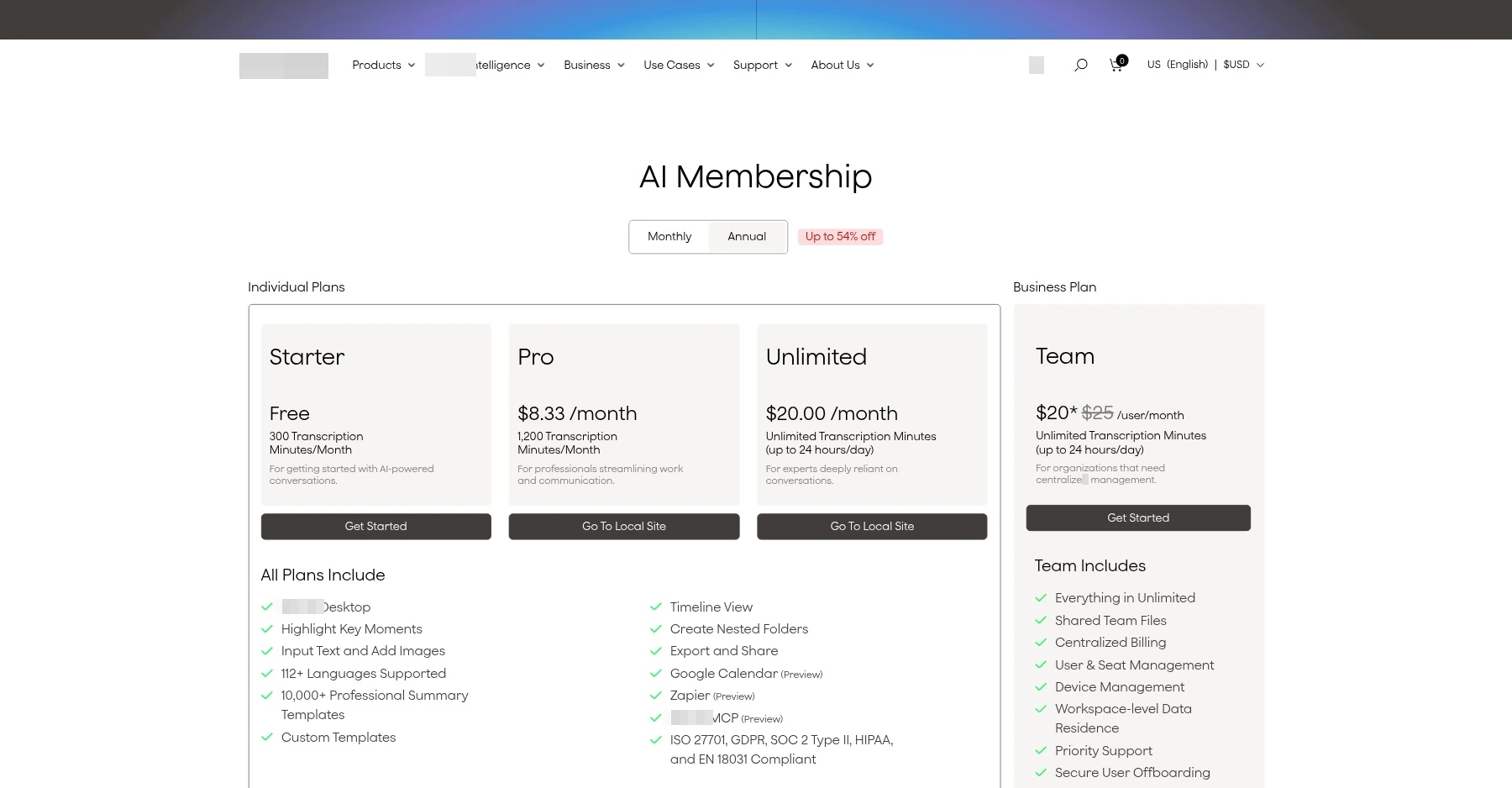
03
Make subscription benefits easier to compare
Plan benefits and billing periods appear together so visitors can understand the differences before choosing an option. The page implementation focuses on information hierarchy, billing-period switching and benefit comparisons.
Compare plan benefits within a single view.
Connect monthly and annual billing choices with plan selection.
Project interface
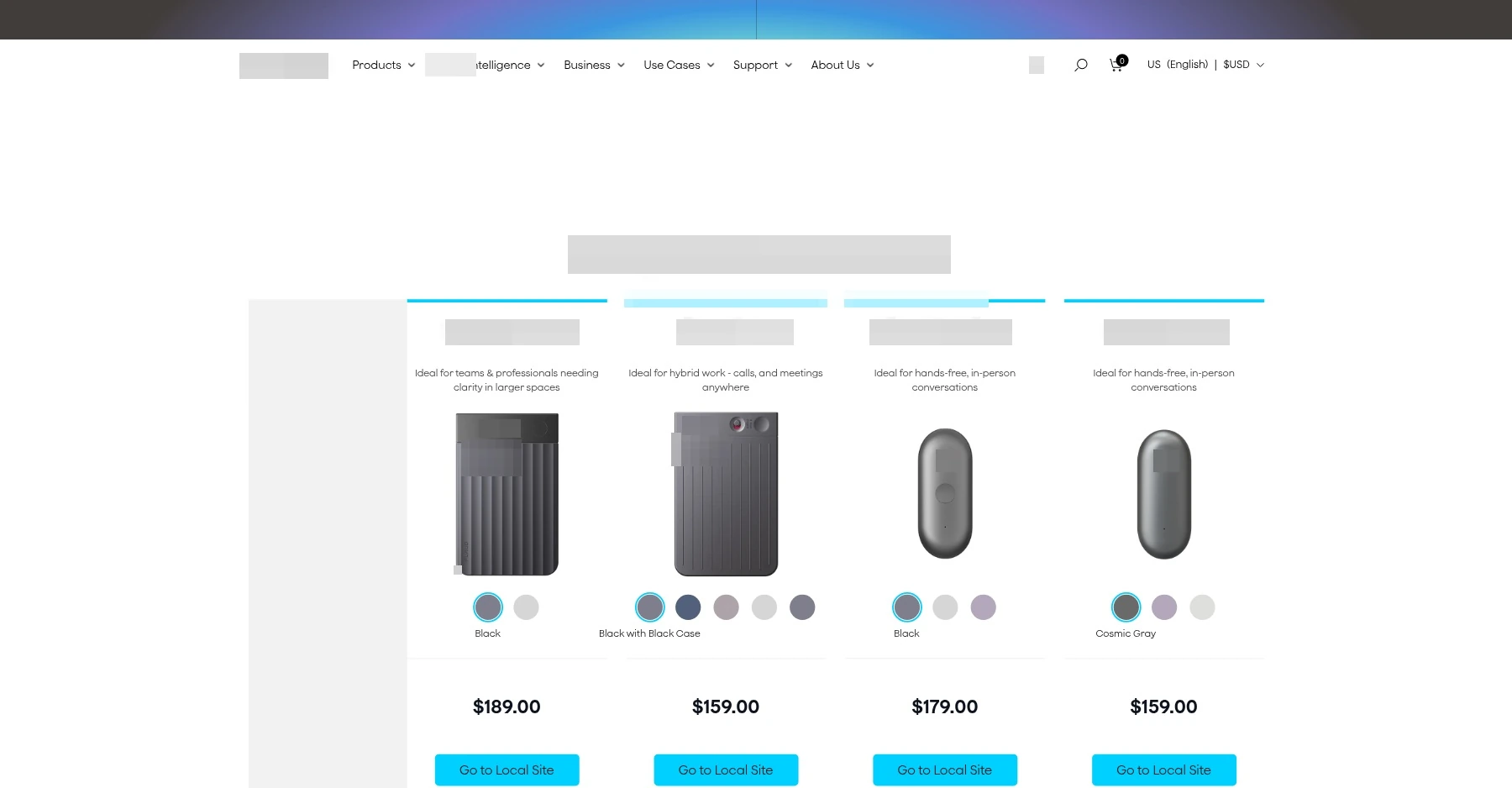
04
Connect device comparison with purchasing
The comparison page places device selection and purchase actions within a continuous decision path. Visitors can review the available options and continue through the corresponding purchase controls.
Keep comparison content connected to purchase actions.
Present multiple product choices within a consistent structure.
Verifying pages and journeys together
An example shows how a legacy content link is checked after migration.
Identify the legacy URL
Locate an existing product or content URL in the migration inventory.
Verify the destination
Confirm that the redirect leads to the corresponding new page.
Test page components
Check plan switching, device comparisons or purchase controls according to the page's purpose.
Check tracking and loading
Verify events and page behavior, then record retest results for the relevant page type.
04Technical approach and workflows
Key decisions
Check migrated assets and visitor journeys together
Use content inventories and URL mappings to verify legacy links and regional page destinations.
Organize pages around business tasks
Subscription selection and device comparison support different decisions and benefit from dedicated pages.
Verify performance by page type
Review home, collection and product pages separately, recording desktop and mobile loading performance before and after optimization.
Functional layers and information flow
Separate the migration into content, URL paths and interactive features, then validate performance and tracking throughout launch checks.
Content and URL Layer
Group migration assets by product, collection, page and article. Use URL mapping and 301 redirects to route existing links to the new pages.
Check hreflang and internal links to reduce broken browsing paths after migration.
Page and component layer
The pricing interface presents tiers, monthly and annual billing, and plan benefits. Device comparisons and other pages follow their specific business requirements.
Support hardware selection, subscription research and channel inquiries through distinct journeys.
Performance and Data Layer
Optimize resource loading and scripts, then check GA4 events and cross-device behavior to confirm that pages remain functional.
Validate performance scores and functional outcomes separately; a single score does not replace business testing.
01
Original site assets and URL
Products, pages, articles and regional paths
02
Migration and feature adaptation
Data migration, redirection and dedicated page reconstruction
03
Launch verification
Access path, page function and performance check
A simplified workflow diagram showing responsibilities and information flow.
05Delivery and validation
Inventory and baseline audit
Inventory the assets and existing URLs, record load performance by page type, and agree on the migration and optimization scope.
Stage output Migration inventory and optimization priorities
Migration and page reconstruction
Migrate products and content, rebuild templates and pages for pricing and comparisons, and configure redirects and regional page relationships.
Stage output New website pages and browsing paths
Optimization and integration testing
Optimize resources and scripts, test plans, comparisons, purchases and inquiry journeys, and verify event collection and accessibility.
Stage output Functional pages and tracking flows
Launch verification and retesting
Check indexing, internal links, regional relationships and core features, then retest desktop and mobile performance.
Stage output Migration verification and historical performance records
Validation checklist
Asset Integrity
Check products, content, navigation and dedicated pages against the migration inventory, including their content and functionality.
Links and Language
Check internal links, redirects, regional language pages and product URL conventions.
Workflows and events
Regression-test subscription, comparison, purchase and inquiry journeys, including their tracking events.
Performance retest
Compare historical desktop and mobile scores for each of the three page types using the recorded test methodology.
06Deliverables and project value
Migration connects content and business tasks
Products, content, legacy links and regional paths are reviewed together while custom pages support subscriptions, comparisons and inquiries.
Performance work spans core pages
Home, collection and product pages receive resource and script-loading changes appropriate to their content.
Retesting alongside functional validation
Desktop and mobile loading records are retained separately from key interaction checks to support subsequent page reviews.